ZP-0164: Difference between revisions
Jump to navigation
Jump to search





(Created page with "==Aluminum Case for Raspberry Pi 5== ==Descriptions== ==Features== ==Gallery== ==Pacakge Includes== ==How to assenble == ==Keywords== * Aluminum case for Raspberry Pi 5, Raspberry Pi 5 aluminum case") |
|||
| (16 intermediate revisions by the same user not shown) | |||
| Line 1: | Line 1: | ||
==Aluminum Case for Raspberry Pi 5== | ==Aluminum Case for Raspberry Pi 5== | ||
[[File:ZP-0164-3.jpg|right|320px]] | |||
===Purchase Link=== | |||
* Amazon: [ https://www.amazon.co.jp/dp/B0CJM6MDH2?ref=myi_title_dp ] | |||
* Aliexpress: [ https://www.aliexpress.com/item/1005006148702475.html ] | |||
==Descriptions== | ==Descriptions== | ||
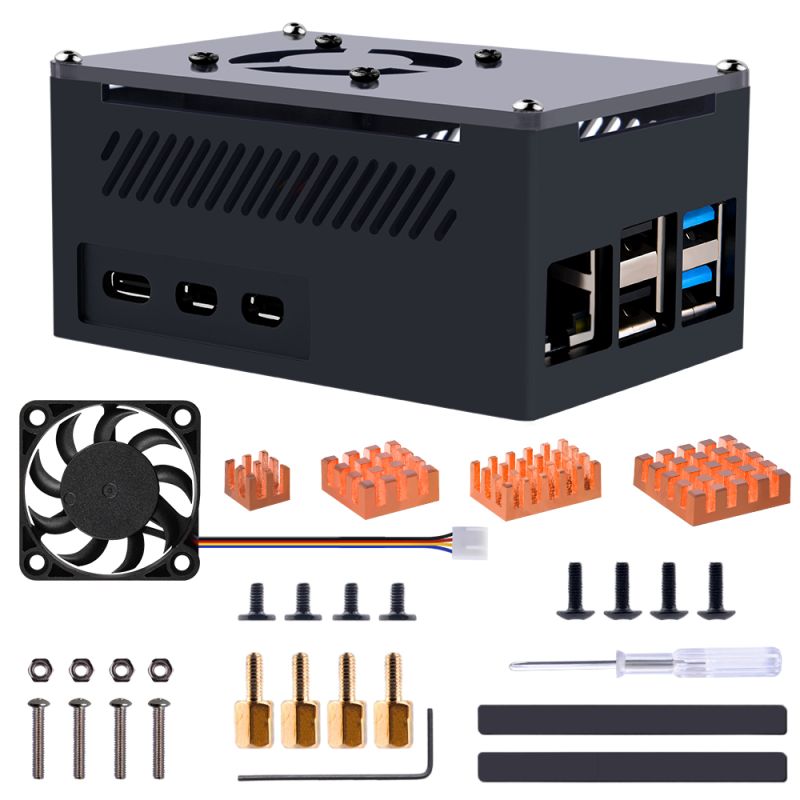
It is Raspberry Pi 5 Case which is made of aluminum and acrylic and fan. | |||
==Features== | ==Features== | ||
* Aluminum alloy case | |||
* Acrylic panel | |||
* Copper heatsinks | |||
* Easy to assemble | |||
* Good Heat dissipation effect | |||
* Easy to access to any port | |||
==Gallery== | ==Gallery== | ||
== | * Product outlook | ||
==How to | [[File:ZP-0164-a01.jpg|left|800px]] | ||
<br style="clear:both;"> | |||
* Heat dissipation | |||
[[ File:ZP-0164-03.jpg|left|800px]] | |||
<br style="clear:both;"> | |||
[[File:ZP-0164-09.jpg|left|800px]] | |||
<br style="clear:both;"> | |||
* Installation details | |||
[[ File:ZP-0164-04.jpg|left|800px]] | |||
<br style="clear:both;"> | |||
* Easy to access Raspberry Pi's ports | |||
[[File:ZP-0164-05.jpg|left|800px]] | |||
<br style="clear:both;"> | |||
* Easy to access TF card | |||
[[File:ZP-0164-06.jpg|left|800px]] | |||
<br style="clear:both;"> | |||
* Application scenario | |||
[[File:ZP-0164-08.jpg|left|800px]] | |||
<br style="clear:both;"> | |||
* How to assemble | |||
[[File:ZP-0164-01.jpg|left|800px]] | |||
<br style="clear:both;"> | |||
<br>Step 1. Fix the fan with long screws and nuts, please note the fan cable's direction. it should towards to the fan cable on Raspberry Pi 5. | |||
<br>Step 2. Paste the copper heat sinks on top of Raspberry Pi 5 after peeling off the protection film. | |||
<br>Step 3. Fix the copper pillars and put the raspberry pi into the aluminum case. | |||
<br>Step 4. Fix the bottom case with screws and paste the anti spliper rubber feets. | |||
<br>Step 5. Connect the fan cable to the fan socket on Raspberry Pi 5. | |||
<br>Step 6. Fix the Acrylic top case to the aluminum case with screws. | |||
==Package Includes== | |||
* 1 x Aluminum case for Raspberry Pi 5 | |||
* 1 x Copper heat sink pack | |||
* 1 x fan for Raspberry Pi 5 | |||
* 1 x Screw driver | |||
[[File:ZP-0164-07.jpg|left|800px]] | |||
<br style="clear:both;"> | |||
==Keywords== | ==Keywords== | ||
* Aluminum case for Raspberry Pi 5, Raspberry Pi 5 aluminum case | * Aluminum case for Raspberry Pi 5, Raspberry Pi 5 aluminum case | ||
Latest revision as of 10:05, 20 March 2026
Aluminum Case for Raspberry Pi 5

Purchase Link
- Amazon: [ https://www.amazon.co.jp/dp/B0CJM6MDH2?ref=myi_title_dp ]
- Aliexpress: [ https://www.aliexpress.com/item/1005006148702475.html ]
Descriptions
It is Raspberry Pi 5 Case which is made of aluminum and acrylic and fan.
Features
- Aluminum alloy case
- Acrylic panel
- Copper heatsinks
- Easy to assemble
- Good Heat dissipation effect
- Easy to access to any port
Gallery
- Product outlook

- Heat dissipation


- Installation details

- Easy to access Raspberry Pi's ports

- Easy to access TF card

- Application scenario

- How to assemble

Step 1. Fix the fan with long screws and nuts, please note the fan cable's direction. it should towards to the fan cable on Raspberry Pi 5.
Step 2. Paste the copper heat sinks on top of Raspberry Pi 5 after peeling off the protection film.
Step 3. Fix the copper pillars and put the raspberry pi into the aluminum case.
Step 4. Fix the bottom case with screws and paste the anti spliper rubber feets.
Step 5. Connect the fan cable to the fan socket on Raspberry Pi 5.
Step 6. Fix the Acrylic top case to the aluminum case with screws.
Package Includes
- 1 x Aluminum case for Raspberry Pi 5
- 1 x Copper heat sink pack
- 1 x fan for Raspberry Pi 5
- 1 x Screw driver

Keywords
- Aluminum case for Raspberry Pi 5, Raspberry Pi 5 aluminum case